Primavera P6 explained: what it means, how it works and why it matters for your business. A clear, practical guide for UAE teams.
ERP Technology AdvisorPublished Updated 10 min read
Last updated: July 2026 · By the QZ Infomatics Construction Technology Team
On a large construction project, hundreds of activities have to happen in the right order, at the right time, with the right resources. Getting that sequence wrong is how projects fall behind and budgets blow out. The tool the industry trusts to plan and control all of it is Primavera P6. This guide explains what Primavera P6 is, how it works, and the scheduling concepts behind it, including the critical path method and Gantt charts, with a clear focus on construction in the UAE.
What is Primavera P6?
Primavera P6 is Oracle’s enterprise project planning and scheduling software, widely regarded as the industry standard for managing large, complex construction and engineering projects. It lets planners build detailed schedules, allocate resources, and control project timelines with precision.
It is built for scale. Primavera P6 is used across construction, engineering, oil and gas, infrastructure, and other project-driven industries to manage timelines, resources, and costs across multiple teams and even multiple projects at once.
Originally developed by Primavera Systems, the software was acquired by Oracle in 2008. Today it is positioned as the standard for planning and scheduling on projects and programmes of any size, which is why so many major contractors and consultants rely on it.
What is Primavera P6 used for?
Primavera P6 is used to plan, schedule, and control projects from start to finish, covering everything from the initial programme to tracking progress on site. Its purpose is to keep complex work on time and on budget.
In practice, teams use Primavera P6 to build a project schedule, define how activities depend on one another, assign labour, plant, and materials, set a baseline, and then track actual progress against that plan. It also supports portfolio management, letting leadership oversee many projects at once.
For a contractor running several jobs simultaneously, this is invaluable. Primavera P6 shows which activities are critical, where resources are stretched, and which projects are ahead or behind, all from one system.
What are the key features of Primavera P6?
Primavera P6’s key features center on critical path scheduling, resource management, and progress tracking, backed by strong reporting. Together they give planners full control over complex programmes.
The core capabilities include:
Critical path method (CPM) scheduling. Automatically calculates the project timeline, critical activities, and float.
Work breakdown structure (WBS). Breaks a project into manageable, organised components.
Activity relationships and constraints. Defines the logic and dependencies that sequence the work.
Resource management. Allocates and levels labour, equipment, and materials to avoid overloads.
Baselines. Locks in an approved plan to measure actual performance against.
Progress tracking and Earned Value Management (EVM). Monitors performance using planned value, earned value, and actual cost, plus indices like SPI and CPI.
Risk management and what-if analysis. Models scenarios and contingency plans before problems occur.
Multi-project and portfolio views. Manages many projects together with executive-level dashboards.
The combination of CPM scheduling and resource control is what sets Primavera P6 apart from simpler tools. It is built to handle the complexity that would overwhelm a basic scheduler.
What is the critical path method (CPM)?
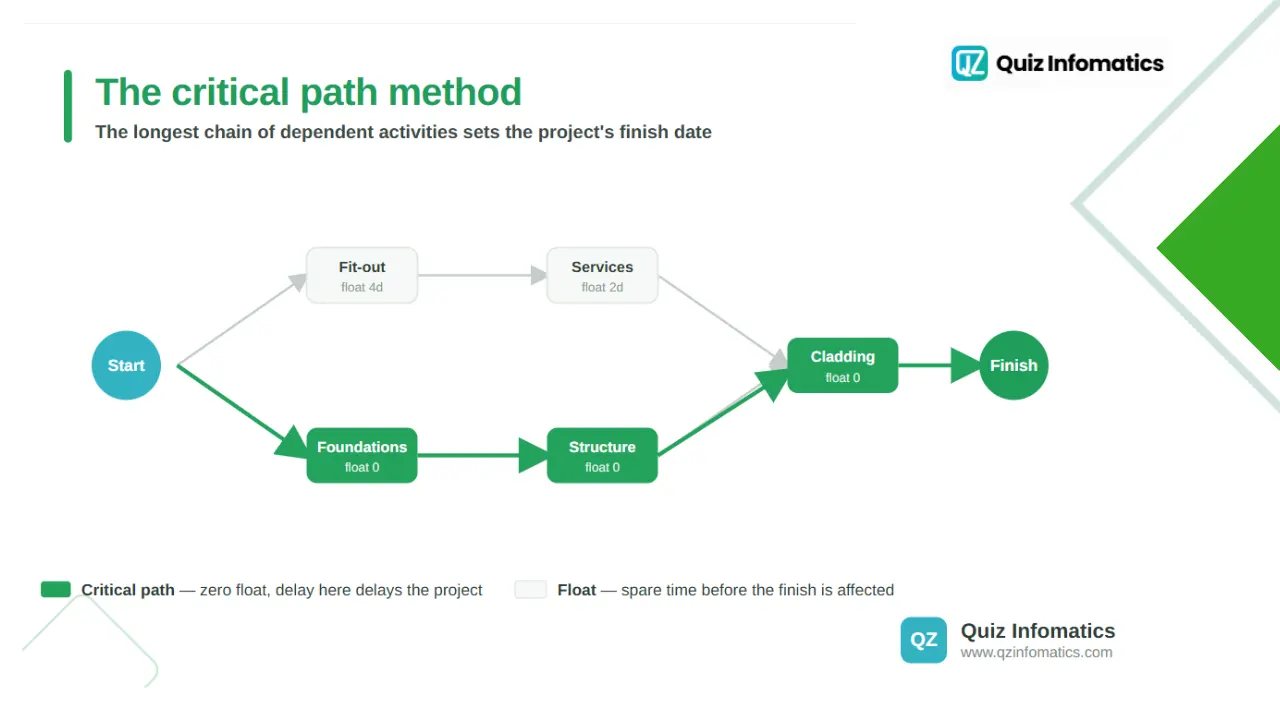
The critical path method (CPM) is a scheduling technique that identifies the longest sequence of dependent activities in a project, which determines the shortest possible completion time. Primavera P6 is built around it.
Here is the idea. Every project has activities that depend on others: you cannot pour a slab before the foundations are ready. CPM works out which chain of these dependent activities takes the longest, and that chain becomes the critical path. Any delay to an activity on the critical path delays the whole project.
Primavera P6 calculates this automatically, along with float, which is the amount of time a non-critical activity can slip without affecting the finish date. This tells a planner exactly where to focus attention: activities on the critical path have no room to spare, while those with float offer flexibility.
Understanding the critical path is the single most important concept in project scheduling. It turns a long list of tasks into a clear picture of what really drives the deadline.
Primavera P6 and Gantt charts
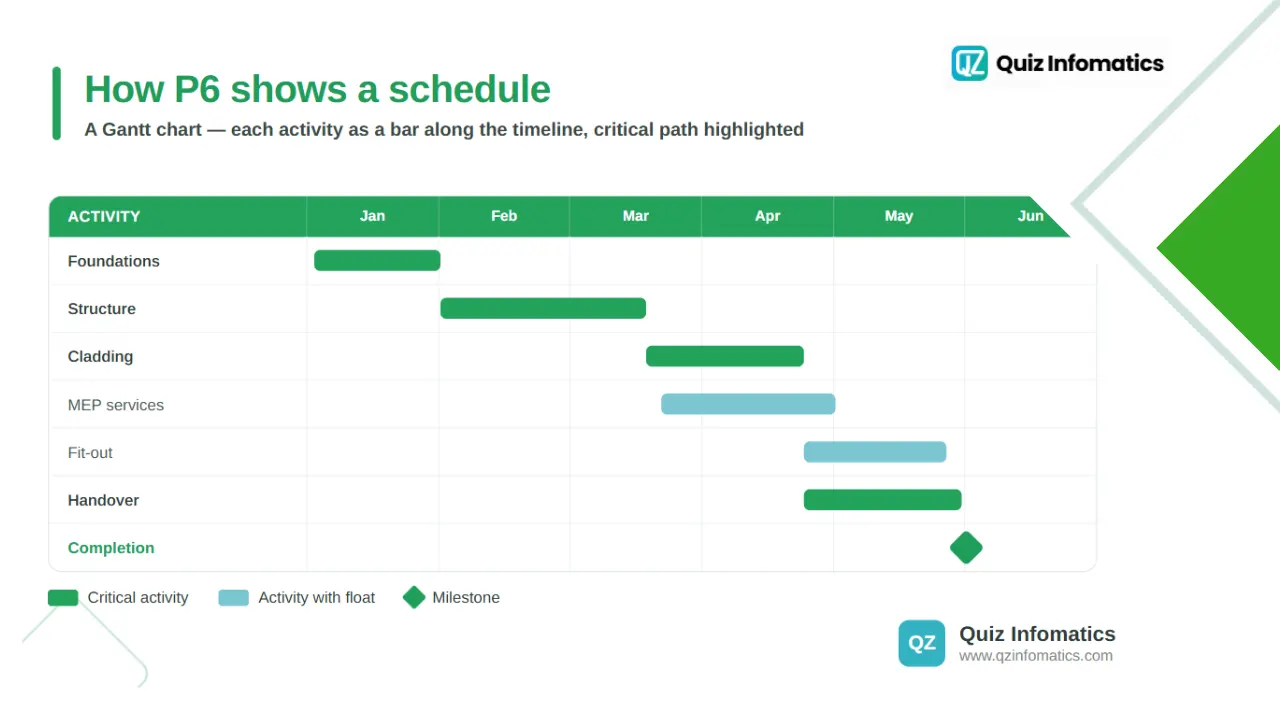
Primavera P6 displays project schedules primarily as Gantt charts, the horizontal bar charts that show each activity’s timing and duration along a timeline. It is the view most people picture when they think of a project schedule.
In a P6 Gantt chart, each activity appears as a bar positioned according to its start and finish dates, with links showing dependencies between activities. The critical path is usually highlighted, so the activities that drive the deadline stand out at a glance. This makes a complex schedule easy to read and communicate.
Alongside Gantt charts, Primavera P6 also offers network diagrams and activity tables for different ways of viewing the same schedule. For a deeper look at how these bar charts work in a construction context, our practical guide to Gantt charts in construction is a useful companion to this article.
What are the editions of Primavera P6?
Primavera P6 comes in two main editions: P6 Professional, a desktop application, and P6 EPPM, a web-based enterprise version. They share the same scheduling engine but suit different needs.
P6 Professional (PPM) is a Windows desktop application favoured by power users such as schedulers and planners. It is fast and detailed, ideal for building and analysing complex schedules.
P6 EPPM (Enterprise Project Portfolio Management) is web-based, designed for collaboration and access across distributed teams. It gives project managers, executives, and field staff shared visibility of schedule and resource data through web and mobile access.
Many organisations use both, with planners working in Professional and wider teams accessing schedules through EPPM. Oracle also offers a newer cloud planning product, but P6 remains the established standard on most large construction programmes.
How does Primavera P6 work?
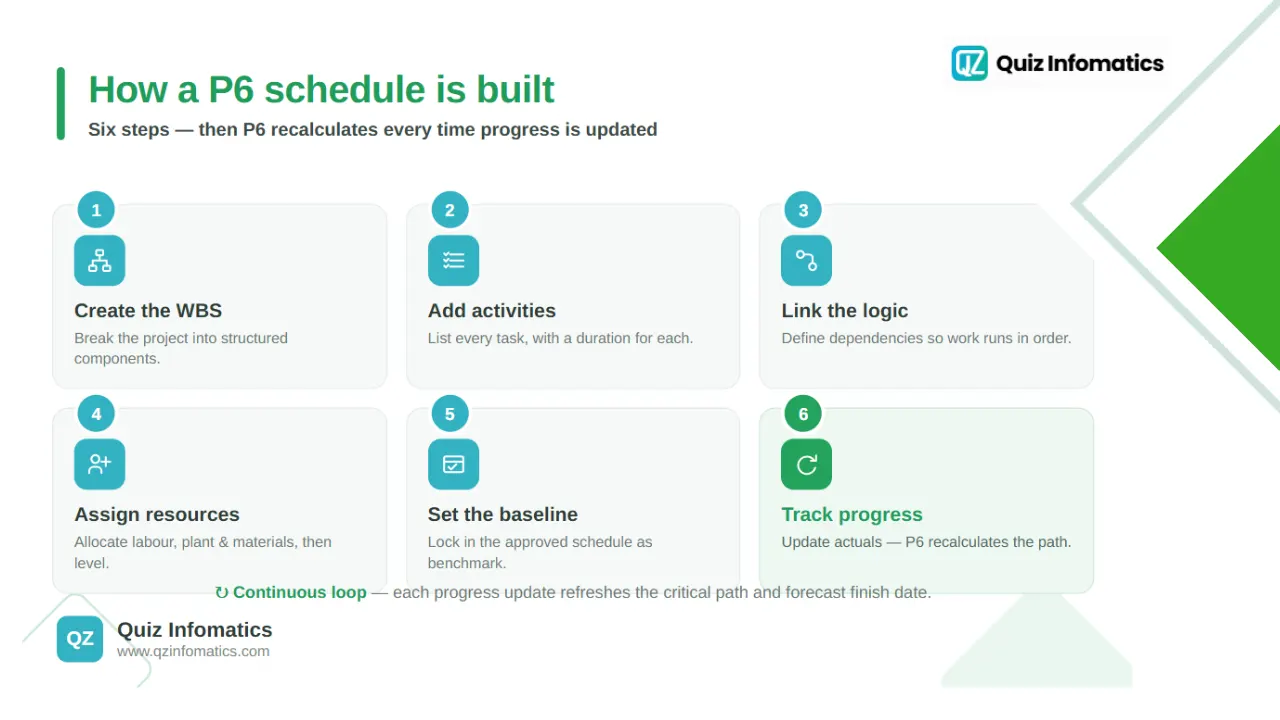
Primavera P6 works by building a logic-linked schedule step by step, then tracking real progress against it. The process is methodical, which is what makes the resulting schedule reliable.
A typical Primavera P6 workflow looks like this:
Create the WBS. Break the project into structured components.
Add activities. List every task, with a duration for each.
Link the logic. Define dependencies, so activities happen in the right order.
Assign resources. Allocate labour, plant, and materials, and level them to avoid overloads.
Set the baseline. Lock in the approved schedule as the benchmark.
Track progress. Update actual progress regularly and compare it against the baseline.
Once the schedule is running, P6 recalculates the critical path and forecast completion date every time progress is updated. This gives planners an always-current view of where the project stands and where it is heading.
Key Primavera P6 terms to know
A few terms come up constantly in Primavera P6, and knowing them makes any schedule far easier to read. These are the essentials.
Activity. A single task in the schedule, with a duration.
WBS (work breakdown structure). The hierarchy that organises activities into logical groups.
Logic (relationships). The dependencies that decide the order activities run in.
Float. The spare time a non-critical activity has before it delays the project.
Critical path. The chain of activities with no float, which drives the finish date.
Baseline. The approved schedule that actual progress is measured against.
Milestone. A key point with zero duration, marking a start, finish, or deadline.
With these terms in hand, a P6 schedule stops looking like a wall of bars and starts telling a clear story about the project.
What are the benefits of Primavera P6?
The main benefit of Primavera P6 is control over complex projects, giving teams reliable schedules, early warning of delays, and clear accountability. On large programmes, that control is worth a great deal.
The main difference is scale: Primavera P6 is built for large, complex, multi-project programmes, while Microsoft Project suits smaller, simpler projects. Both schedule work, but they target different needs.
Primavera P6 handles enterprise-level complexity, with powerful resource management, portfolio oversight, and the detailed control that large construction and infrastructure projects demand. Microsoft Project is more accessible and easier to learn, which makes it a good fit for smaller projects or teams that do not need enterprise features.
For major UAE construction programmes, P6 is usually the tool of choice, because clients and contracts often expect its level of rigour. Smaller contractors running simple, single-trade jobs may find P6 more than they need, and choose a lighter tool.
What are the challenges of Primavera P6?
The main challenges of Primavera P6 are its learning curve, cost, and complexity, which can be more than smaller contractors require. It is a powerful tool, and power comes with a price.
Primavera P6 takes real training to use well; building and maintaining a proper CPM schedule is a skilled job, which is why scheduling is often a dedicated role. Licensing and setup costs are also higher than for simpler tools, and the depth of features can feel overwhelming for a small team.
None of this diminishes its value on the projects it is built for. It simply means P6 is the right tool for large, complex work, and possibly overkill for a small, straightforward job.
Scheduling is only half the picture: P6 and cost control
Primavera P6 is outstanding at controlling the schedule, but a construction project also has to control cost, and the two are different jobs. Time and money need to be managed together for a project to succeed.
P6 masters the programme: what happens when, in what order, with what resources. But the commercial side of a project, the bill of quantities, budgets, procurement, subcontractor accounts, and progress billing, lives in a different kind of system. Managing that side well is just as critical to profit as hitting the schedule, and it is where a construction ERP for UAE contractors comes in.
In practice, the strongest contractors pair rigorous scheduling with tight commercial control. The schedule tells you if you are on time; the bill of quantities and cost system tell you if you are making money, and the quantity surveyor, whose role we cover here, connects the two. Bringing construction budget and subcontractor management into one platform is what turns a well-scheduled project into a profitable one.
Primavera P6 in the UAE
In the UAE, Primavera P6 is the standard scheduling tool on large construction and infrastructure projects, often expected by clients and written into contracts. Its use is deeply established across the region’s major programmes.
The UAE’s pipeline of large, complex projects, combined with FIDIC-based contracts and a strong focus on programme control, makes P6 a natural fit. On these projects, an approved P6 schedule is frequently a contractual requirement, and detailed programme records are central to managing extensions of time and delay claims.
For UAE contractors, strong scheduling in P6, paired with the right commercial software, is a genuine advantage. If you want the wider context on the business systems behind this, our plain-English guide to what an ERP system is sets the foundation.
How QZ Infomatics helps contractors
Winning on a construction project means controlling both time and cost, and that calls for the right tools on each side. Scheduling and commercial control work best when they work together.
While specialist tools like Primavera P6 handle the programme, a construction ERP handles the money: BOQ, budgets, procurement, subcontractor accounts, and progress billing. Bringing that commercial side into one connected system gives contractors real-time control over their margins, not just their milestones.
If you would like help with that side of the project, our construction ERP software for UAE contractors brings BOQ, cost control, budgeting, subcontractor management, and progress billing into one platform, built for how contracting businesses actually work.
Primavera P6, in a nutshell
To recap the essentials:
Primavera P6 is Oracle’s enterprise scheduling software, the industry standard for planning large, complex construction projects.
It is built around the critical path method, which identifies the sequence of activities that determines the project’s completion date.
It displays schedules as Gantt charts, alongside network diagrams and tables, and adds resource management, baselines, and Earned Value tracking.
It comes in two editions: P6 Professional for power users and P6 EPPM for web-based collaboration.
It controls the schedule, but cost, BOQ, and subcontractor management belong in a construction ERP, and the two together give full project control.
Primavera P6 is a powerful tool for keeping complex projects on time. Paired with strong commercial control, it helps contractors deliver on both the deadline and the budget, which is what a successful project really means.
Share this article
Frequently asked questions
Primavera P6 questions
What is Primavera P6 used for?
Primavera P6 is used to plan, schedule, and control large, complex projects. It builds detailed timelines, manages resources, tracks progress, and identifies the critical path, mainly in construction, engineering, and infrastructure.
What is the difference between Primavera P6 and Microsoft Project?
Primavera P6 is built for large, complex, multi-project programmes with advanced resource and portfolio management, while Microsoft Project is simpler and easier to learn, suiting smaller projects.
What is the critical path method in Primavera P6?
The critical path method identifies the longest chain of dependent activities that determines the shortest possible project duration. P6 calculates it automatically, along with float, so planners know which activities drive the deadline.
Does Primavera P6 use Gantt charts?
Yes. Primavera P6 displays schedules primarily as Gantt charts, showing each activity's timing and dependencies along a timeline, usually with the critical path highlighted.
Is Primavera P6 hard to learn?
Primavera P6 has a steeper learning curve than simpler tools, because building and maintaining a proper CPM schedule is a skilled task. This is why scheduling is often a dedicated role on large projects.
Who uses Primavera P6?
It is used by contractors, consultants, planners, and project managers on large construction, engineering, oil and gas, and infrastructure projects, particularly where detailed scheduling and programme control are essential.
What is the difference between P6 Professional and P6 EPPM?
P6 Professional is a Windows desktop application for power users, while P6 EPPM is a web-based version designed for collaboration and access across distributed teams. Both share the same scheduling engine.
Does Primavera P6 handle project costs?
P6 includes resource and cost tracking and Earned Value Management, but commercial functions like the BOQ, procurement, and subcontractor accounts are usually managed in a dedicated construction ERP alongside it.
QZ Infomatics Construction Technology Team
- QZ Infomatics is a Dubai-based ERP and IT consultancy (Business Bay) that implements construction and contracting software across the UAE and GCC. The team helps contractors bring BOQ, cost control, procurement, subcontractor accounts, and progress billing into one connected system that complements scheduling tools, drawing on hands-on experience with construction ERP for UAE projects. This guide reflects that practical experience helping contracting businesses plan and control their work.
Continue reading
Related articles
Construction & Contracting
UAE VAT on Construction Contracts, Retention and Advance Payments
How UAE VAT applies to construction contracts — the date of supply on progress payments, why retention VAT falls due before you are paid, and how advances must be invoiced.
ERP Technology Advisor · 18 August 2026 · 11 min read
Book a free 30 minute call with QZ Infomatics in Dubai. You will leave it with a platform recommendation, the reasoning behind it, a realistic timeline and an indicative budget band — before you commit to anything.
✓ A consultant who delivers projects, not a sales desk
✓ Odoo, Microsoft Dynamics 365 and Oracle NetSuite compared honestly
✓ Licence cost and implementation cost quoted as separate numbers
✓ If we are not the right fit for you, we will say so